HP
SELF-INITIATED PRODUCT & WORKFLOW INNOVATION
Features
Excel to Figma
FROM EXCEL SPECS TO FIGMA
Streamlining the Design Review Workflow
[Excel → Plugin → Figma visual]
A Figma plugin that bridges structured Excel specifications and visual product design
Role
UI/UX Designer
Project Type
Self-initiated Product & Workflow Innovation
Duration
[02 - weeks]
Tools
Figma · Excel · Figma Plugin · AI
I used AI as an accelerator to help move quickly from the initial concept to a working plugin, while keeping the design thinking, UX architecture, and product decisions firmly in my hands.
OVERVIEW
Bridging specifications and design
In enterprise product workflows, structured specifications and visual designs often live in separate tools. Excel contains information such as content, string IDs and requirements, while Figma contains the visual representation of the product.
Although these workstreams are closely connected, teams often need to move between them during design reviews and development handoff.
I explored how this gap could be reduced by bringing structured specification information directly into Figma.
PAIN POINTS
Context switching
Users need to move between Excel and Figma to understand the same requirement.
Handoff friction
Developers need to reference both the visual design and the underlying specification.
Fragmented review
Different stakeholders may look at the same information from different tools and contexts.
Repetitive work
Transferring structured information into the design environment can become repetitive, especially when working with larger datasets.
Manual cross-checking
Content, IDs and design elements have to be manually compared between different tools.
WHO IS AFFECTED?
Designing for the workflow, not just one user
Although designers are the primary users of the plugin, the workflow affects multiple stakeholders.

DESIGNER
Needs to connect structured specifications
with the visual design without constantly switching tools.

DEVELOPER
Needs access to IDs, content and specifications while implementing the design.

PRODUCT / BUSINESS STAKEHOLDER
Needs to review whether the design reflects the defined requirements.
THE OPPORTUNITY
What if the specification could come to the
design?
"How can I reduce the distance between structured
specifications and the visual design?"
THE OPPORTUNITY
What if the specification could come to the
design?
"How can I reduce the distance between structured
specifications and the visual design?"
DESIGN CHALLENGE
Reduce unnecessary context switching.
Eliminate continuous back-and-forth friction
between Excel sheets and Figma design frames.
Generate editable Figma content
Outputs must result in live, natively alterable auto-layout components rather than static, flattened snapshots.
Create a workflow that fits naturally
Integrate seamlessly into standard Figma UI
paradigms without forcing unnatural behavioral shifts.
THE SOLUTION
I designed and developed a plugin that allows structured Excel information to be brought directly into Figma.
USER FLOW
Import the excel Spec
Review the imported info
Generate the figma output
Review and edit the generated content
Open Figma
START
END
Launch the plugin
KEY DESIGN DECISIONS
WHAT I LEARNED

Screen name
Content
String id
Remarks
Auto-generated header component with active Figma styling rules
Excel files can have different columns depending on the data. To handle this, I designed the plugin to automatically understand the imported data and create the table structure accordingly. Instead of using fixed columns, it generates the required headers based on the Excel file.
Simply bringing a spreadsheet into Figma as an image would make the content difficult to edit and use. So, I designed the plugin to convert the data into editable Figma content. This allows designers to edit text, adjust layouts, change styles, rearrange information, and easily integrate the content into their Figma files. The goal was to make the imported data a usable part of the design workflow instead of just a static reference.
Dynamic Headers
Preserve editability
SCREEN NAME
CONTENT
STRING ID
REMARKS
Constraint_message
Select at least one item to continue
Citemconstraint
all products
paper_detected
Cpaperdetected
all products
Notify the paper is
detected in tray 1
537
× 38
menu_page
Settings
Csettings
THE INTEGRATED SOLUTION
The Final Experience
The final experience brings everything together into a simple, seamless workflow: users
easily import their data, inspect structured components, edit content directly in Figma,
and maintain a consistent visual design throughout.
Technical Exploration
Exploring alternative technical implementation
approaches and parsing methods without
getting blocked.
Plugin API Concepts
Quickly unpacking Figma's document tree
node structures, AutoLayout constraints, and
font loading states.
Scaffolding & Syntax
Generating initial code structures, TypeScript
interfaces, and dynamic table generation
algorithms.
Rapid Iteration
Debugging edge-case implementation errors,
performance benchmarking, and testing
varied file sizes.
UX isn't only about designing screens
One of my biggest takeaways from this project was that meaningful UX improvements
often come from redesigning the workflow around a product, not just the interface itself.
01 — PRINCIPLE
Look beyond the interface
"The biggest opportunity wasn't simply creating a better
table. It was reducing the distance between two connected
workstreams."
02 — PRINCIPLE
Design for the ecosystem
The workflow involved designers, developers, product
managers, and localized content writers.
03 — PRINCIPLE
Automation should reduce complexity
Automation is valuable only when it makes the user's work
simpler.
04 — PRINCIPLE
AI can accelerate product experimentation
AI-assisted development helped me move faster from idea →
prototype → working product.
FINAL TAKEAWAY
"Designing the bridge, not just the interface."
This project taught me that good UX is not always about adding more features. Sometimes, it’s about
making the existing workflow simpler and connecting the tools and information people already use.
By combining UX design, Figma architecture, interaction design, and AI-assisted prototyping, I was able to turn a
disconnected Excel-to-Figma process into a smoother, more connected, and highly creative experience.
Excel Specification

Import into Plugin

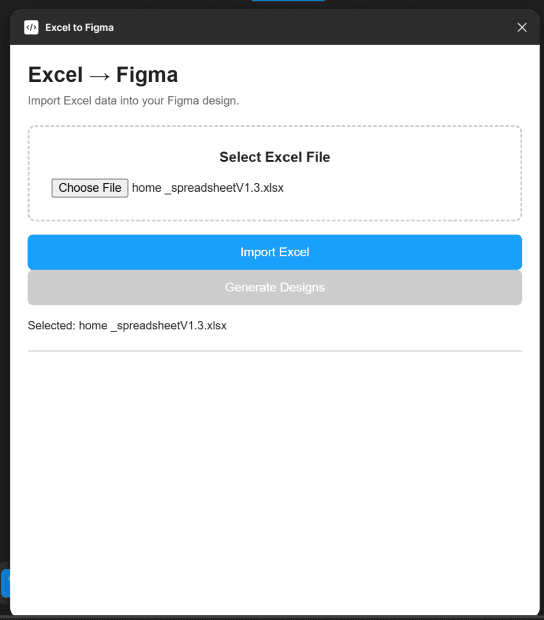
Figma Editable Structured information


AI-Assisted Design &
Development
By combining AI-augmented rapid code generation with deliberate human interface design, what would normally take multiple engineering sprints was developed in under four
weeks.
LEVERAGING MODERN TOOLING